
The key differences between open-source solutions (such as Nextcloud or ownCloud) and commercial public clouds (such as Microsoft OneDrive/365) center around data control, software transparency, and hosting model.
Here are the most important areas of difference based on the sources provided:
1. Digital sovereignty and data control
• Open-source: These solutions place a strong emphasis on digital sovereignty. They allow organizations (especially in the public sector) to become independent from foreign providers and avoid pressure from foreign governments or large technology corporations. The user has full control over where the data is stored (e.g., exclusively within a specific country, such as Switzerland).
• Public clouds: In this model, data is transferred to a third party, which may raise privacy and security concerns in the context of the jurisdiction to which the provider is subject.
2. Hosting model and vendor lock-in
• Open-source: These offer a self-hosted (on-premises) model, which means that the software runs on the customer’s own servers or those of selected partners. This avoids vendor lock-in, i.e., dependence on a single service provider.
• Public clouds: Services such as OneDrive are hosted in the provider’s data centers. Although they offer easy access from any device, the user is closely tied to the ecosystem and infrastructure of a given company (e.g., Microsoft, Google).
3. Code transparency and security
• Open-source: The source code is fully auditable, which makes it easier to detect vulnerabilities and so-called “backdoors.” Security is based on transparency and the support of a huge community of developers.
• Public clouds: They use closed-source software, which makes it difficult to independently verify security vulnerabilities. Instead, they offer their own advanced protection mechanisms, such as ransomware detection, Microsoft Defender protection, and Personal Vault with multi-factor authentication.
4. Functionality and integration
• Open-source: They focus on content collaboration. Nextcloud Hub offers modules such as Files, Talk (chat and video), Groupware (calendar, email), and Office, as well as a local AI assistant. Integration with existing IT infrastructure and data silos is also possible.
• Public clouds: They offer deeply integrated office application ecosystems (Word, Excel, PowerPoint) combined with advanced AI tools (e.g., Microsoft Copilot). These solutions are often sold in subscription packages (Personal, Family, Business) that automatically combine cloud storage with software licenses.
Summary of differences in table form (based on sources):
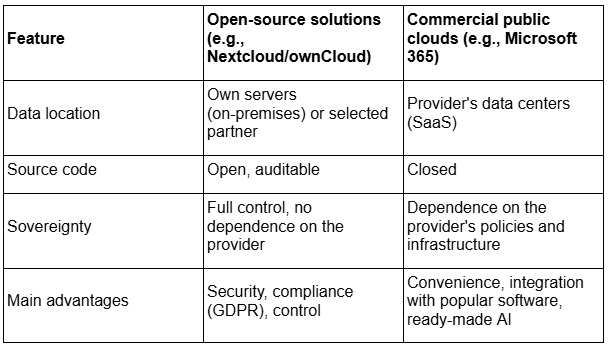
Analogies for better understanding:
Choosing between these solutions can be compared to deciding where to live:
• An open-source solution is like building your own house on your own land. You have complete control over every window and lock, you know exactly what’s in the walls, and no one can kick you out, but you have to take care of the foundation and roof yourself.
• A commercial public cloud is like renting a luxury apartment in a modern skyscraper. You have access to a swimming pool, security, and air conditioning without worrying about repairs, but you have to follow the owner’s rules, pay rent, and accept that the owner has a spare key to your door.